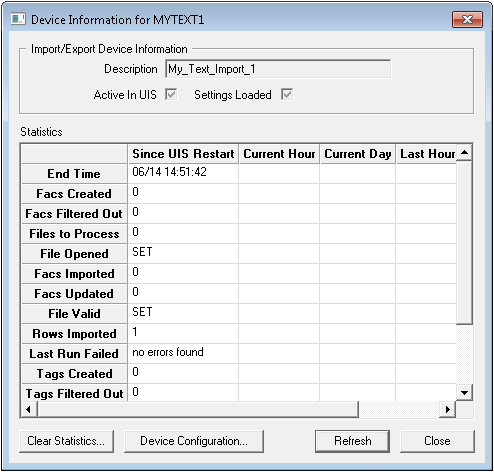
The Details option on the Import/Export Devices context menu opens a Device Information dialog box for the highlighted import/export device. The dialog box provides a more fine-grained set of device details, as well as access to the import/export device's configuration.
Click the following image to see a sample Device Information dialog box:
The following table lists and describes Device Information properties.
| Property | Description |
|---|---|
|
Active in UIS |
Flag that indicates that the device is currently active in the UIS. This does not guarantee that the device is connected or running. |
|
Clear Statistics |
Enables you to permanently delete all statistics for the device. Upon clicking this option, you are asked to specify a time period. |
|
Description |
Displays the device Description as configured in the DDS. |
|
Device Configuration |
Opens the device editor for the selected device. |
|
Settings Loaded |
Flag that indicates that settings for the device have been fully loaded into the UIS. |
The following table lists and describes the rows in the Statistics table. Values and statistics displayed may be for the Current Day, Current Hour, Last Day, Last Hour, and Since UIS Restart.
| Row | Description |
|---|---|
|
End Time |
Indicates the time that the import finished. Corresponds to the SYIMEND system UDC. |
|
Facs Created |
Corresponds to the SYIMFCRT system UDC. |
|
Facs Filtered Out |
Corresponds to the SYIMFFLT system UDC. |
|
Facs Imported |
Corresponds to the SYIMFIMP system UDC. |
|
Facs Updated |
Corresponds to the SYIMFUPD system UDC. |
|
File Opened |
Corresponds to the SYIMFFOP system UDC. |
|
Files to Process |
Indicates the number of files processed. If there are no files to process (i.e., value is 0), no status points are updated. Corresponds to the SYIMFFND system UDC. |
|
File Valid |
Corresponds to the SYIMFVAL system UDC. |
|
Last Run Failed |
Indicates whether or not the last import attempt failed. Corresponds to the SYIMSTAT system UDC. |
|
Rows Imported |
Indicates the number of rows imported during the last import attempt. Corresponds to the SYIMRIMP system UDC. |
|
Tags Created |
Indicates the number of PNT tags created during the last import attempt. Corresponds to the SYIMTCRT system UDC. |
|
Tags Filtered Out |
Indicates the number of PNT tags ignored during the last import attempt. Corresponds to the SYIMTFLT system UDC. |
|
Tags Imported |
Indicates the number of PNT tags imported during the last import attempt. Corresponds to the SYIMTIMP system UDC. |
|
Tags Updated |
Indicates the number of PNT tags updated during the last import attempt. Corresponds to the SYIMTUPD system UDC. |
|
Values Updated |
Indicates the number of values updated during the last import attempt. Corresponds to the SYIMVUPD system UDC. |

|
|
|

